- Published on
AWS outage
- Authors

- Name
- Ritu Raj
- @rituraj12797
Introduction
The Internet experienced a major AWS outage that affected services such as Snapchat, Zoom, Pinterest, Fortnite, Slack, and many others. This post examines the root cause of the failure and the lessons we can draw from it.
References
The Root Cause: A Race Condition in DynamoDB's DNS
The outage began when services could not find or connect to DynamoDB endpoints. This wasn't just a simple "bad update." The real issue was a deep-seated race condition in the complex automation that manages DynamoDB's DNS. To understand this whole incident, you need to know about some technical parts and tools that were involved in this.
1. Route 53
This is Amazon's DNS service. Think of it as a giant, public table of records. Its job is to tell any service (like your browser or the Slack app) "When you ask for dynamodb.us-east-1.amazonaws.com, you need to go to these IP addresses: 1.2.3.4, 5.6.7.8, etc."
2. The DNS Planner
This is the "brain." It's an internal system that constantly monitors the health and capacity of thousands of load balancers. Its job is to create a "DNS Plan" (like a config file) that says, "Here is the perfect list of healthy IPs that should be in Route 53 right now." It creates new versions of this plan every few moments.
3. The DNS Enactor
This is the "hand." It's a worker whose job is to take the newest plan from the Planner and actually make it a reality in Route 53. It runs in three separate Availability Zones (AZs), independent copies for resilience.
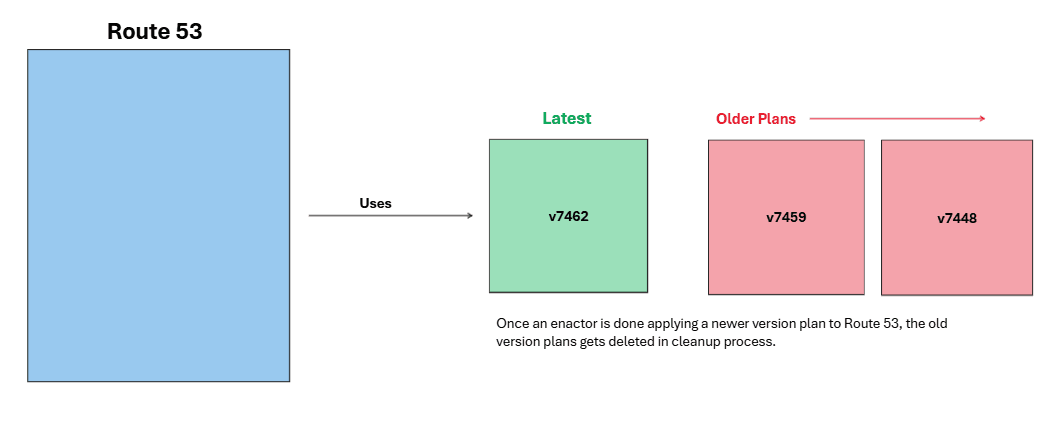
Route 53 uses the latest version plans to maintain its entries, which can be illustrated with an example. The older versions are cleaned up subsequently in the cleanup process by Enactors.

How Does An Enactor Update Entries In Route 53: Step-wise
1. Get Plan
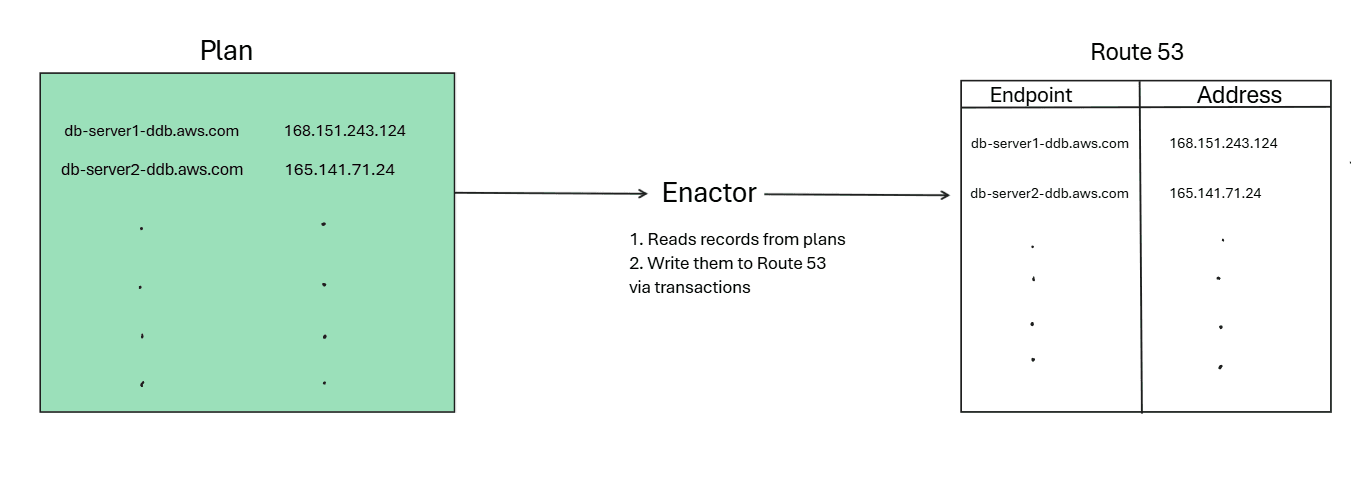
An Enactor wakes up and grabs the newest plan file provided by the Planner to update entries in Route 53, and it does a one-time check to make sure the plan it just grabbed is newer than the plan currently being used by Route 53.
2. Starts The Write Process
A plan file isn't just one DNS record; it contains a list of all DynamoDB endpoints (the main one, the IPv6 one, the FIPS one, etc.). The Enactor iterates through this list one by one.
For each endpoint in its list, the Enactor tells Route 53, "Please update your record for endpoint-X to use the IP addresses listed in my plan." This is done using a "transaction," which means it either fully succeeds or it fails and can be retried. This is what prevents two Enactors from writing to the same endpoint at the exact same time.
3. Clean-up
After an Enactor successfully applies its new plan to all endpoints, it kicks off a clean-up job to delete any old, unused plan files (e.g., v7448, v7459) to save space.
What Exactly Happened
I will try to explain in 10 steps with an example what happened and how the systems went down:
- Say the planner produced a Plan A (7448) An Enactor (1) picked this up. It checked if it's latest (Yes it is).
- Enactor 1 started iterating on its entries & applying them to Route 53. But this was slow (specific reason for this is still un-clear).
- In the meantime, the Planner produced new plans like 7459 ( Plan C), 7462 ( Plan D).
- A new Enactor (2) picked up Plan D (7462) & now since this is the latest, it also started to write to Route 53.
- Now Enactor 1 and Enactor 2 are both writing 1 is slow, 2 is fast Enactor 2 carries on & completed writing (Entered, locked, updated records).
- Now since Enactor 1 was slow, it was still writing its records from Plan A to Route 53.
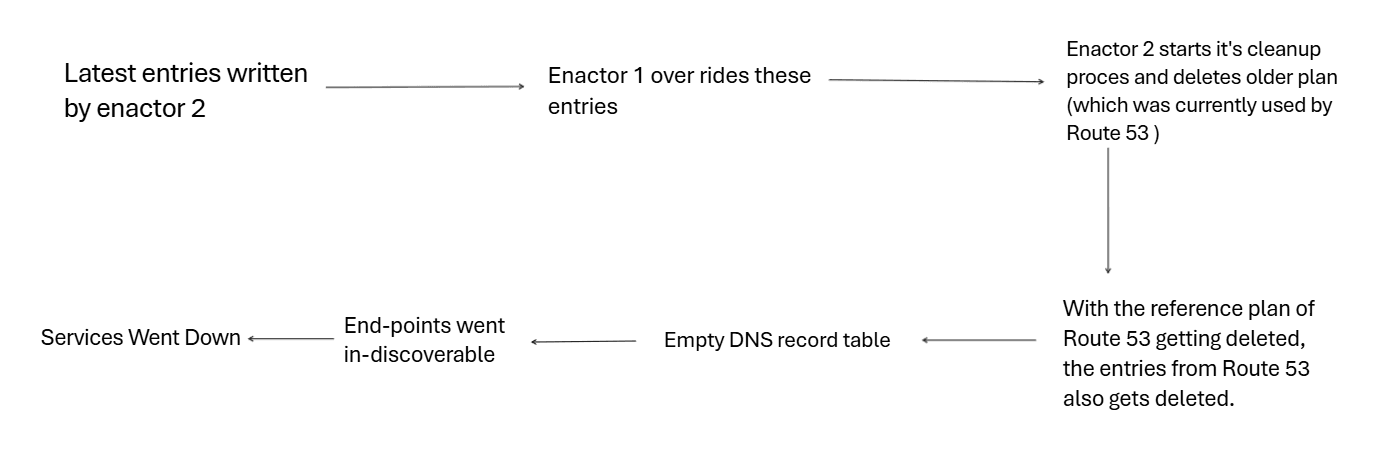
- This way, Enactor 1 overrode correct entries of Plan D with older ones from Plan A (and since Enactor 1 had already started, it had no way of stopping).
- Coincidentally, just as Enactor 2 was about to start the cleanup process for removing old versions, Enactor 1 completed, and now Route 53 used version 7448 (old version) for its entries.
- Enactor 2's cleanup started. It identified 7448 as old (though this was used by R53 for entries) and deleted it.
- Seeing its reference plan getting deleted, Route 53 deleted its entries.
Result - collapsing dependency chains
Because AWS's internal services depend on each other, failures in DNS caused cascading outages. Interdependent chains broke as services that relied on global configuration or metadata were unable to proceed, causing widespread unavailability.
What is a SPOF (DNS in this case)
A single point of failure (SPOF) is a component whose failure causes the entire system to fail. Think of it like an articulation point: when it goes down, connections break in a graph. Many services depended on DNS as a single source of truth. Incorrect DNS entries made those services unable to locate required resources, turning DNS into a SPOF in this incident.
Why a single-region outage affected multi-AZ architectures
Although the failure was limited to the us-east-1 region, its impact was amplified because that region hosts many global services. When applications deployed across multiple Availability Zones need global data, they often depend on services in us-east-1. With those global services unavailable, applications in other AZs experienced failures as well. This interdependency is what led to the large-scale impact on 20 October 2025.
Fun Part
Some organizations hosted their status pages on AWS, so when AWS services failed, those status pages also went offline. In many cases, monitoring records were not written during the outage window, which led some observers to mistakenly conclude there had been no outage. It is like a guard who fell asleep and therefore did not see the thief.
Also, the smart beds of some people were linked to services dependent on AWS, which resulted in half-inclined beds hindering the sleep of many Sleep8 customers.